Sidechain Compression: Ducking, Kick and Bass, and Voiceover Control
This guide shows how to route an external key into a compressor, set it for kick and bass or voice over music, filter the key for subtle control, and when a volume shaper does the job better.
By Delia Marchbanks, in Compression & Dynamics
A normal compressor listens to the signal it is processing. A sidechain compressor listens to something else. Feed the detector a different track, called the key, and the compressor turns its own track down whenever the key gets loud. That simple change makes room in a mix in a way no equalizer can: two parts can share the same frequencies, as long as they take turns.
The technique is behind the bass that steps aside for each kick, the music bed that drops under a voice in a spoken-word edit, and the pulsing pads of dance music. This guide covers the routing, the settings and a few alternatives.
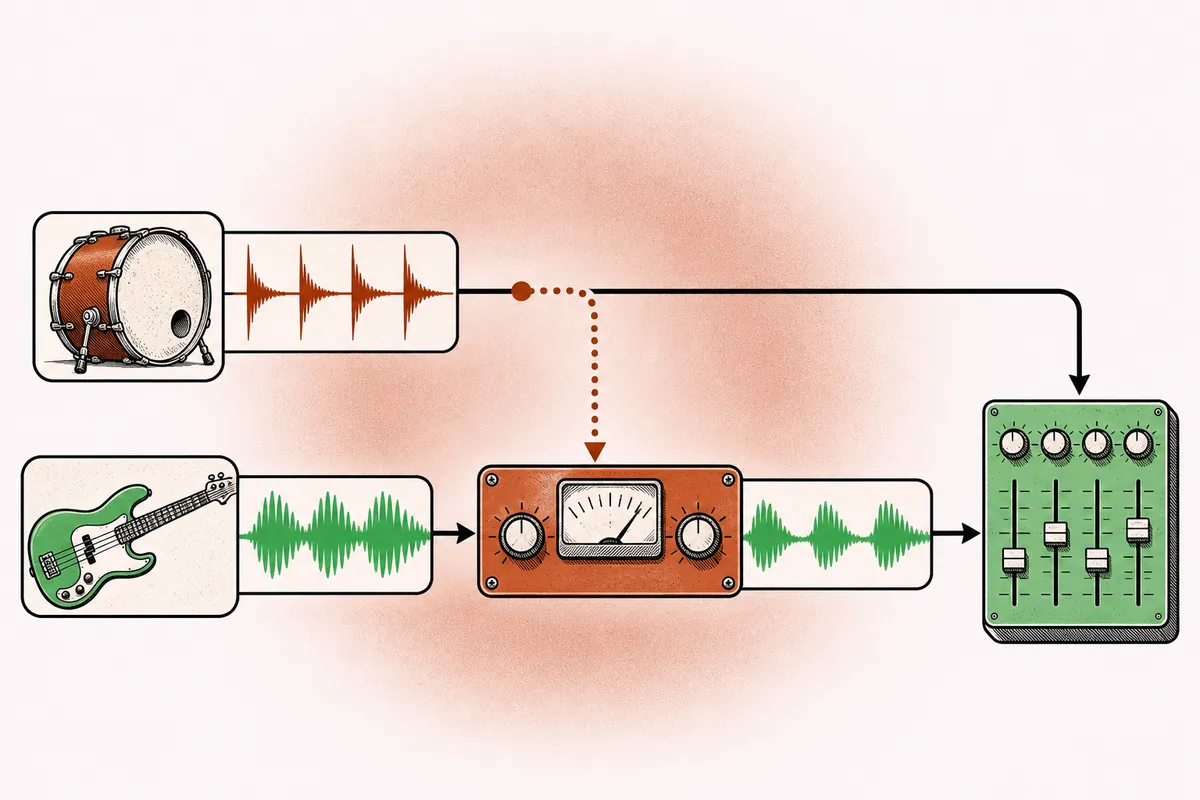
How the routing works
Every compressor has a detector that decides how much gain reduction to apply. On most plugins, that detector can be switched from the internal signal to an external input. The steps in a typical DAW:
- Insert a compressor on the track you want to turn down, for example the bass.
- Open the plugin's sidechain or key input selector and choose the source, for example the kick. Some DAWs do this through a send from the kick track to the compressor's sidechain input.
- Set the compressor's detector to external, if it has a separate switch.
- Play the session and watch the gain reduction meter move with each kick.
The kick itself is not affected. It keeps playing to the mix as normal; only a copy of its signal reaches the detector.
Kick and bass
The kick and the bass both live mostly below 150 Hz. When they hit at the same moment, their energy adds up, the low end gets muddy, and the bus compressor or limiter reacts to the combined peak. Ducking the bass a few decibels each time the kick sounds gives the kick a clear window.
Starting points for subtle control:
| Control | Start | Notes |
|---|---|---|
| Ratio | 3:1 to 6:1 | Higher for more obvious ducking |
| Attack | 0.5 to 5 ms | Fast enough to clear the kick's onset |
| Release | 50 to 150 ms | Recover before the next note |
| Gain reduction | 2 to 6 dB | Felt more than heard |
Set the release by ear against the tempo. At 124 BPM, a quarter note lasts about 484 ms, so a release around 100 ms brings the bass back well before the next kick. Too short a release and the bass snaps back with a click; too long and it never fully recovers, losing weight.
If the kick and bass still collide after ducking, the problem might be arrangement or tuning rather than level. The guide on kick drum mixing and the guide on mixing low end cover tuning the kick to the key, choosing which part owns the sub, and how much ducking a style tolerates.
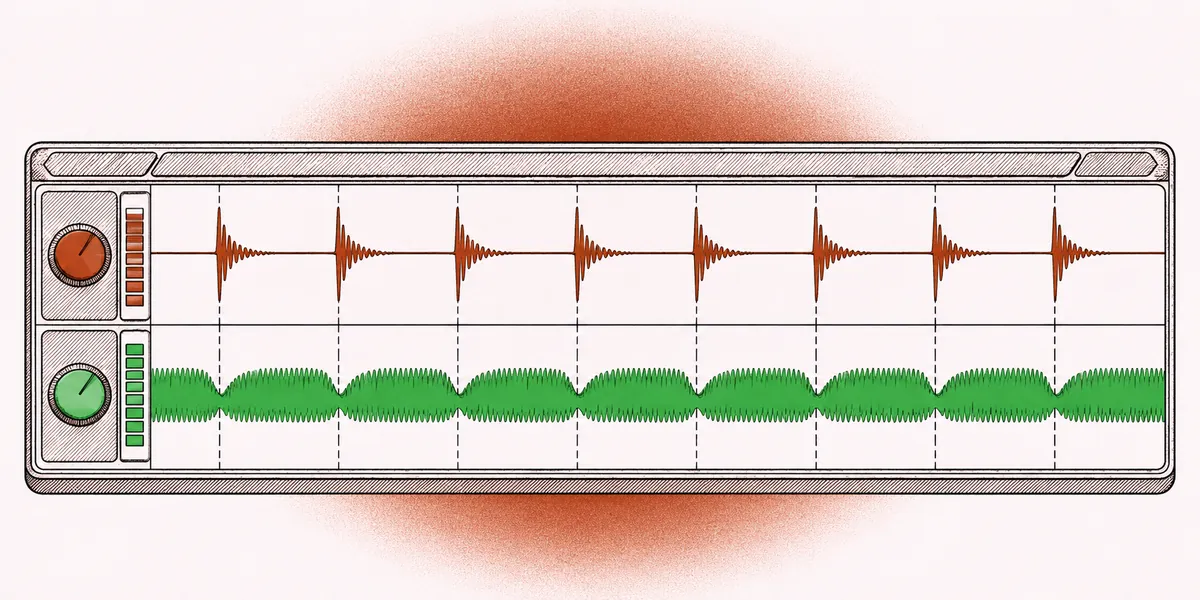
The pumping effect
Push the same setup much harder and the ducking becomes a rhythmic effect. In many electronic styles, pads, chords and even the whole music bus duck heavily on each kick and swell back up between them.
- Ratio 10:1 or higher, attack as fast as possible, gain reduction of 8 to 15 dB.
- Release set so the swell peaks just before the next kick. Many people time it to an eighth or quarter note.
- Often the key is a dedicated, silent kick track playing four on the floor, so the pumping continues even in breakdowns where the audible kick drops out.
A muted trigger track like this is called a ghost key. Because it never reaches the mix, you can place it anywhere in the bar to create off-beat or syncopated pumping too.
Voiceover and dialogue ducking
In any edit that combines speech and music, the music should drop when someone talks and come back up in the gaps. Sidechain compression does this automatically.
- Put a compressor on the music bus.
- Key it from the voice track or the voice bus.
- Use a moderate ratio, 2:1 to 4:1, with attack around 10 to 30 ms and release around 300 to 800 ms. The slower times stop the music from bouncing on every syllable.
- Aim for 4 to 10 dB of reduction while the voice is speaking.
Some DAWs and dedicated ducker plugins offer a hold control, which keeps the gain reduced for a moment after the voice stops. That prevents the music from surging back up between words.
For finished productions, many engineers use the sidechain as a rough pass, then refine it with level automation. Automation can anticipate a sentence and lift the music exactly when it suits the edit, which no compressor can.
Filtered sidechain
A compressor's detector does not care what it hears; it only measures level. Filtering the key changes what triggers gain reduction. This is useful in two directions.
Internal sidechain high-pass. On a mix bus or a drum bus, a high-pass filter on the detector around 60 to 120 Hz stops the kick and bass from causing all the compression. The compressor then reacts more to the mid-range, and the low end stops making the whole mix duck. Many bus compressors include this filter, as explained in the guide on the console bus compressor.
Band-limited external key. If you key the bass from the full drum bus, every hi-hat and snare hit will trigger ducking. Put a low-pass filter on the key, around 100 to 150 Hz, and only the kick will register. The same idea in reverse lets a vocal duck a guitar only when the vocal is in its presence range.
Frequency-specific ducking. A dynamic EQ or multiband compressor with an external key can duck only part of the spectrum. Key the low band of a bass from the kick and you clear space at 50 to 90 Hz, while the bass's mid-range growl stays steady. Key a 2 to 4 kHz band of a guitar bus from the lead vocal and the guitars make room for the words without dropping in level overall. This is far less audible than full-band ducking.
Volume shapers as an alternative
A compressor reacts to the key, so its timing depends on the attack, release and level of that signal. A volume shaper, also called a gain envelope or LFO tool, draws a fixed level curve that repeats in sync with the tempo.
| Approach | Strength | Weakness |
|---|---|---|
| Sidechain compressor | Follows the real kick, including fills and variations | Timing depends on key level and detector |
| Volume shaper | Exact, repeatable curve, no latency | Ignores what the kick actually plays |
| Level automation | Total control per moment | Time-consuming |
For a steady four-on-the-floor pump, a volume shaper is often more precise and easier to fine-tune, since you can draw the curve shape directly. For a live drum part with variations, a real sidechain follows the performance better.
Sidechain on a gate or expander
Compressors are not the only processors with a key input. A gate keyed from another track opens only when the key plays. Put a gate on a sustained synth pad or a noise layer and key it from the hi-hats, and the pad turns into a rhythmic pattern that follows the drummer. Keyed from a kick, a gate on a low sine tone lets you add a tuned sub layer that sounds only with each kick hit, with the tone's decay set by the gate's hold and release, often 150 to 300 ms.
An expander keyed from a vocal works the opposite way to ducking: it lets a reverb return or a background part swell up only when the singer is present. These uses are less common, but they show that the key is a general tool for making one part react to another.
Common mistakes
- Too much ducking on kick and bass. If the bass audibly disappears on every hit, the low end feels thin. Aim for gain reduction you feel rather than hear, unless pumping is the goal.
- Wrong key source. Keying from a full drum bus makes everything duck. Use the kick alone, or filter the key.
- Forgetting latency. Lookahead on a sidechain compressor delays its own track; plugin delay compensation should handle it, but a low-latency mode can bypass that. The guide on buffer settings and latency explains when that happens.
- Clicks on release. Very short release times on low frequencies can distort the waveform. Lengthen the release a little or use a slower attack.
For other dynamics techniques, the compression type guide and the parallel compression guide are good next reads.
Quick answers
What is a key in sidechain compression?
The key is the signal that drives the compressor's detector. It can be another track, a bus or a muted trigger track, and it is not heard through the processed track.
How much should the bass duck under the kick?
Usually 2 to 6 dB for a natural result. Electronic styles that use pumping as an effect go well beyond that.
Is sidechain compression better than EQ for kick and bass?
They solve different problems. EQ separates the two in frequency; sidechain separates them in time. Many mixes use a little of both.
Can I duck music under speech without a compressor?
Yes. Level automation does the job with more precision, and many editors combine a quick sidechain pass with manual rides.