Parallel Compression: Blending Dense and Dry on Drums, Vocals and Bass
After this guide you will be able to set up parallel compression with a bus or a mix knob, choose aggressive settings for the compressed copy, and blend it so the track gets denser without losing its punch.
By Delia Marchbanks, in Compression & Dynamics
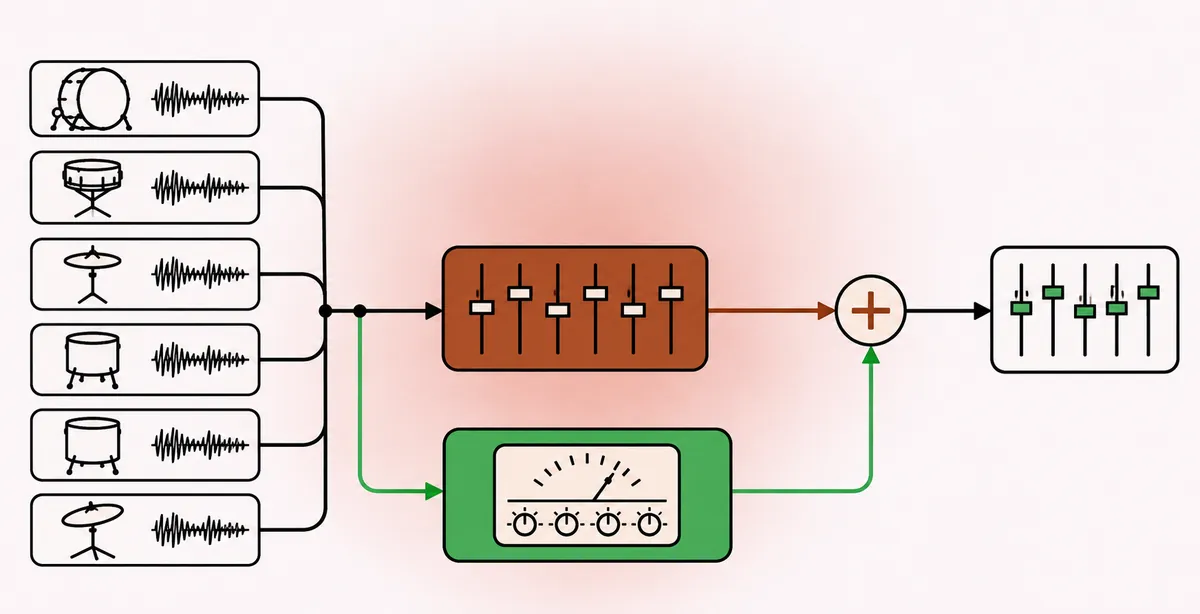
Ordinary compression turns loud parts down. Parallel compression takes a different route: it leaves the original signal untouched and adds a heavily compressed copy underneath it. The loud peaks of the original stay sharp, while the compressed copy fills in the quiet details between them. The result is a track that sounds denser and louder without the flattened, squashed feel of heavy compression applied directly.
Engineers sometimes call it New York compression, after the drum sounds it became known for. The technique works on almost any source, but drums, vocals and bass are where it earns its keep.
Why it works
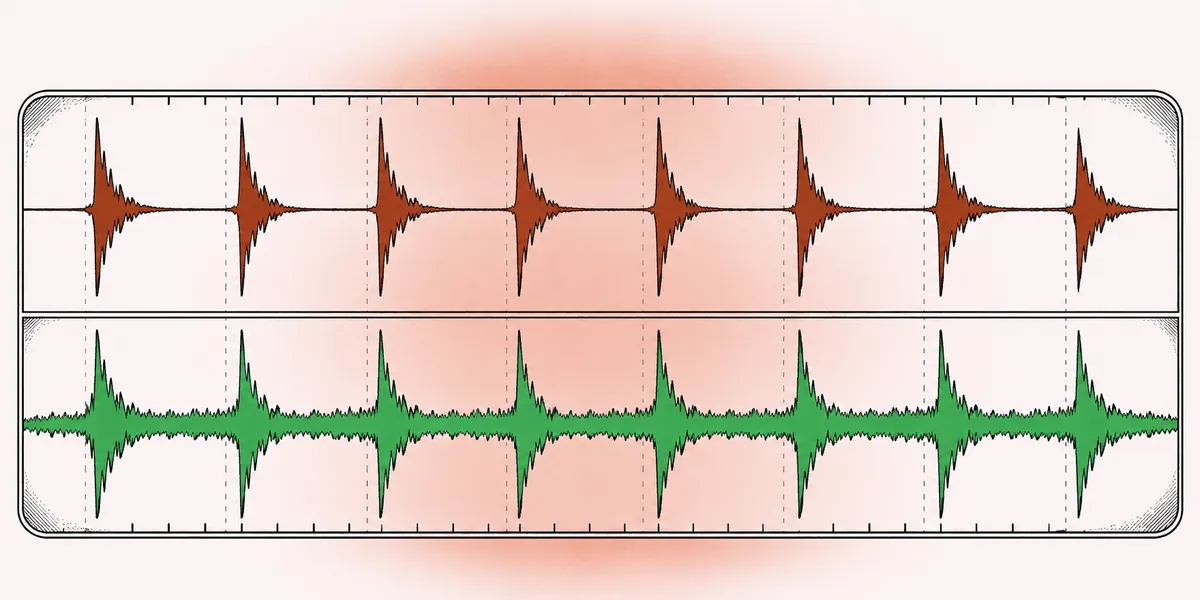
When you compress a signal hard, the peaks are pulled down and the quiet parts are, after makeup gain, brought up. The quiet parts are where the room tone, the ghost notes, the breath and the sustain live. Mix that compressed version under the dry one and the peaks of the combined signal are still mostly set by the dry track, because the compressed copy is far below it at those moments. Between peaks, though, the compressed copy is relatively loud, so it adds body.
In other words, parallel compression is a form of upward compression. It raises low-level detail rather than reducing loud events. That is why it keeps transients intact, something downward compression with fast attack cannot do.
Two ways to set it up
With a send and a bus
- Create an auxiliary bus and insert a compressor on it.
- Send the source tracks to this bus with pre-fader or post-fader sends. Post-fader is usually easier, because the compressed copy then follows your fader moves.
- Keep the original tracks routed as normal.
- Bring the compressed bus fader up from silence until you hear the effect, then back it off a touch.
This method lets one compressor serve many tracks and lets you process the parallel bus further, for example with EQ.
With a mix knob
Many compressor plugins have a dry/wet or mix control. At 100 percent wet you hear only the compressed signal; at 30 percent you hear a blend. This is parallel compression in a single plugin, with the alignment taken care of inside the plugin. It is quick, and it is ideal on single tracks such as a lead vocal or a bass.
The bus method gives more control over EQ and routing; the mix knob is faster. Both produce the same basic effect.
Setting the compressed copy
Since the dry signal preserves the dynamics, the compressed copy can be pushed far harder than you would ever use directly.
| Control | Starting point | Purpose |
|---|---|---|
| Ratio | 4:1 to 10:1, or limiting | Firm, obvious squash |
| Attack | Fast, 0.1 to 1 ms | Flatten transients in the copy |
| Release | 50 to 150 ms | Lift sustain between hits |
| Gain reduction | 10 to 20 dB | Strong density in the copy |
| Makeup | Bring the copy to a healthy level | Easier blending |
Solo the compressed bus while you set it: it should sound obviously crushed, perhaps unpleasant on its own. Then unsolo and blend. Most of the time, the right level is lower than your first guess. A good check is to mute and unmute the parallel bus at matched loudness. The track should feel thicker and more present with it, not simply louder.
A FET style compressor is a classic choice for drums because of its fast attack and added harmonics. A clean VCA gives a more neutral result. The guide to different compression types describes what each one brings.
Settings by source
Drums
Drums are the textbook case. Send the kick, snare, toms and room microphones to the parallel bus. Overheads are optional; heavily compressed cymbals can turn harsh, so some people send them at a lower level or leave them out.
- Compress the copy hard with fast attack and a release that recovers before the next hit. At 100 BPM, an eighth note lasts 300 ms, so a release of 100 to 200 ms works well.
- EQ the parallel bus after the compressor. A gentle low shelf around 80 to 100 Hz and a lift around 5 to 8 kHz can add weight and excitement. Cut harsh build-up near 2 to 4 kHz if the cymbals become brittle.
- Blend until the ghost notes and room sound come forward without the kit losing snap.
On a drum bus that already has its own glue compressor, as described in the guide on the console bus compressor, the parallel bus sits alongside it rather than after it.
Vocals
Parallel compression on a vocal keeps the natural phrasing of the dry track while the compressed copy holds up the soft words and the ends of phrases.
- Use a mix knob around 20 to 40 percent, or a parallel bus fed post-fader.
- Settings on the copy: ratio 4:1 to 8:1, attack 1 to 5 ms, release 50 to 100 ms, around 10 dB of reduction.
- Be careful with sibilance and breaths, which heavy compression exaggerates. A de-esser before the parallel send, explained in the guide on taming sibilance, keeps the copy from turning spitty.
Bass
Bass guitar often needs consistent level so it holds the bottom of the mix. Parallel compression gives that consistency while keeping the pluck of each note.
- Compress the copy hard, 8:1 or more, and add saturation after the compressor if the bass disappears on small speakers. The harmonics give the ear something to follow above 100 Hz.
- Some engineers high-pass the parallel copy at around 150 Hz so it only thickens the mid-range growl, while the dry track carries the sub. This keeps the low end clean. The guide on mixing low end covers why that separation helps.
Keep both paths aligned
Parallel processing relies on two copies of the same signal arriving at the same moment. If one path is delayed, even by a millisecond, the two copies interfere and create comb filtering: a hollow, phasey sound with notches across the spectrum.
Most DAWs apply plugin delay compensation automatically to buses and sends, so the compressed copy lines up with the dry track. Problems appear when:
- A plugin reports its latency incorrectly.
- The DAW uses a low-latency mode that bypasses compensation, explained in the guide on latency and buffer settings.
- Hardware inserts are used without a matching offset entered in the DAW settings.
A quick alignment check: duplicate a track, route the copy through the parallel bus with the compressor bypassed, flip its polarity, and play both. If the result is near silence, the paths are aligned. If you still hear a thin, filtered sound, there is an offset to fix.
Mix knobs inside a single plugin are aligned internally, which is one reason they are popular.
Parallel compression on the mix bus
The same idea can work across a whole mix, with more restraint. A mix knob at 10 to 25 percent on a mix bus compressor adds density to quiet passages while the choruses keep their peaks. Use gentler settings than on drums: ratio around 4:1, attack 10 to 30 ms, release on auto or around 300 ms, and no more than 6 to 8 dB of reduction on the wet side. Listen to the transitions between sections. If a quiet verse suddenly sounds nearly as loud as the chorus, the blend is too high and the arrangement loses its shape.
Saving a parallel chain as a template is worth the minute it takes. A drum parallel bus and a vocal parallel bus, routed and ready but muted, make it quick to judge whether a song needs the effect at all.
Common mistakes
- Blending too high. If the track sounds flat and noisy, the compressed copy is too loud. Pull it down by 3 to 6 dB.
- Not compressing the copy enough. Light compression on the parallel bus does little, because the dry signal already provides the same sound.
- Ignoring noise. Heavy compression lifts hiss, amp hum and bleed. Gate or EQ the copy if the noise floor rises noticeably.
- Comparing at different loudness. The blend adds level, so turn down the overall group when switching it in and out.
For a wider view of dynamics processing, the compression guides cover attack and release, sidechain and more.
Quick answers
Is parallel compression the same as using a mix knob?
Yes, in effect. A mix knob blends the dry and compressed signals inside one plugin, which is parallel compression with the alignment managed internally.
How much should the compressed copy be reduced?
Often 10 to 20 dB of gain reduction. The dry signal keeps the dynamics, so the copy can be squashed far more than you would use directly.
Why does my parallel bus sound phasey?
The two paths are probably out of time. Check that plugin delay compensation is on and that no low-latency mode is bypassing it.
Should I send overheads to the parallel drum bus?
It depends on the cymbals. Hard compression makes them louder and harsher, so many people send overheads at a reduced level or leave them out.