Mixing on Headphones: Getting Reliable Results Without Speakers
After reading, you will know how headphones mislead a mix, which tools correct for it, and a routine for judging width, low end and balance so the result holds up on speakers, earbuds and car systems.
By Delia Marchbanks, in Room & Monitoring
Plenty of good mixes start on headphones. A rented apartment, a shared house, a child asleep in the next room or an untreated room with a booming bass mode all push people toward cans. The good news is that headphones remove the room from the equation, which is the single biggest source of error in home mixing. The bad news is that they introduce a different set of errors, and unless you know what they are, a mix that sounds wide and balanced in your ears falls apart on a pair of speakers.
This guide explains where headphones tell the truth, where they lie, and a working routine that compensates for both.
What changes when the room disappears
With speakers, each ear hears both speakers. Sound from the left speaker reaches your right ear a fraction of a millisecond later and slightly duller, filtered by your head. Your brain uses those differences to place sounds in a stereo image in front of you. The room adds reflections that make the low end fuller and blend everything together.
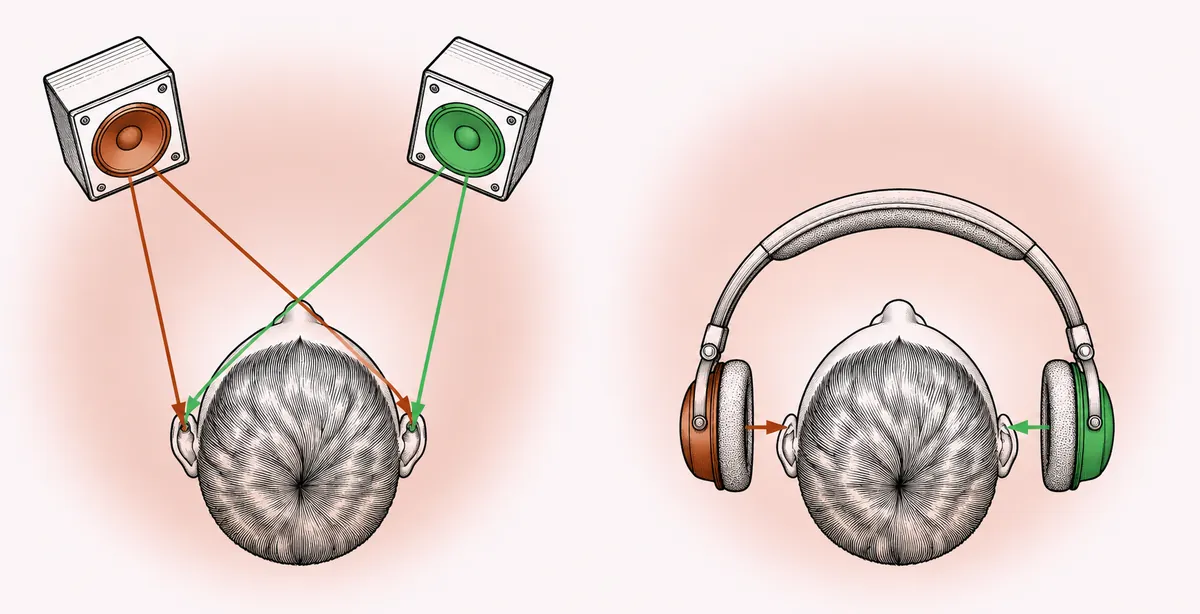
Headphones remove all of that. The left channel goes to the left ear only, the right channel to the right ear only. The result is a stereo image that sits inside your head, stretched from ear to ear, with a hard-panned element sounding as if it sits right against one side of your skull. Three consequences follow:
- Panning feels more extreme. A guitar panned 60 percent left can sound almost fully left on headphones but fairly central on speakers.
- Reverb and ambience sound louder. Without room reflections to mask them, small reverb levels feel obvious, so mixes made on headphones often end up too dry on speakers.
- Center elements feel louder. A mono vocal sits in the middle of your head with great clarity, which tends to lead to vocals a little low when heard on speakers.
None of this is a reason to give up on headphones. It is a reason to correct your instincts and to check.
Open, closed or semi-open
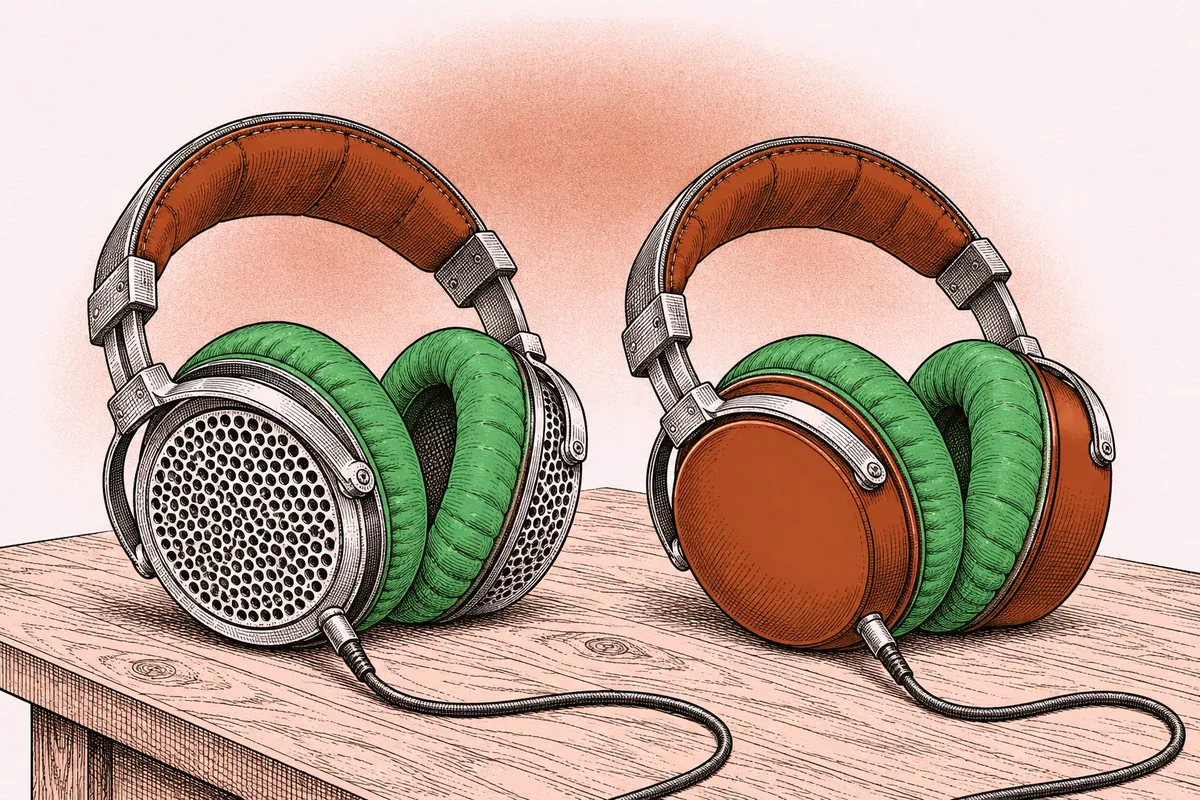
Open-back headphones have vented earcups that let air and sound pass through. They usually give a more natural sense of space and a less congested low end, and they are generally preferred for mixing. They leak sound in both directions, though, so they are a poor choice for tracking next to a microphone or in a noisy house.
Closed-back headphones seal the ear. They isolate you from outside noise and keep the click from bleeding into a vocal mic, which makes them the standard for recording. The sealed cup often produces resonances and an exaggerated or uneven bass response, which can mislead low end decisions.
Semi-open designs sit between the two. The comparison of open, closed and semi-open headphones covers comfort, impedance and pads in more detail. For mixing alone in a quiet room, open backs are the usual starting point; if you can only own one pair and you also record, a closed pair works with the checks below.
Crossfeed and speaker simulation
Crossfeed plugins put back a little of what headphones remove. They send a filtered, slightly delayed copy of each channel to the opposite ear, imitating the way speaker sound wraps around the head. The delay is short, roughly 0.3 to 0.6 ms, and the crossfed signal is rolled off in the highs.
The effect is subtle but useful: hard-panned elements move inward, the image moves slightly forward and long sessions become less tiring. More elaborate tools go further and simulate a full speaker setup in a room, including reflections. Treat them as a reference view, not as a replacement for real speakers. Two practical rules:
- Put crossfeed or simulation on your monitor path, never on the mix bus, so it is not printed into the bounce.
- Pick one setting and stay with it. Your ears adapt to a consistent view much faster than to one that changes every day.
Frequency response correction
No headphone is flat. Most have a rising or uneven top end between 2 and 10 kHz, and many closed designs carry a bass bump. Correction software applies an EQ curve, built from averaged readings of a given headphone model or of your own pair, that brings the response closer to a target. The common targets are designed to make headphones sound roughly like neutral speakers in a good room, which is not the same as a perfectly flat line.
Correction can make a real difference, especially on the low end and in the presence region. A few cautions apply. Model-averaged curves do not account for the way your pair fits your head, and pad wear changes the response over time. Like crossfeed, correction goes on the monitor output, not the mix. And if a correction curve makes you reach for big EQ moves on your mix, double-check on another system before trusting it.
Judging the stereo image
Because headphones exaggerate width, use a few anchors:
- Check in mono often. A mono button on your monitor path collapses the mix and shows phase problems and elements that disappear. Width effects that sound impressive in headphones can vanish or turn hollow in mono, as explained in the guide to stereo width and panning.
- Keep the low end and lead elements centered. Kick, bass, lead vocal and snare usually sit in the middle. This is a convention for good reason: it keeps the mix solid on any system.
- Pan by reference. Compare your panning against a reference track at matched loudness. If your guitars sound wider than the reference, they probably are.
- Raise reverb slightly above what feels right. Then confirm on speakers or earbuds. A reverb return 1 to 3 dB above your first instinct is a reasonable starting point to confirm.
Judging the low end
Low end is the hardest part of headphone mixing. Below about 60 Hz, headphones can reproduce frequencies quite well in theory, but the seal of the pads, the fit and the absence of physical vibration all make sub-bass hard to judge. You feel sub-bass on speakers and in clubs; on headphones you only hear it.
Practical strategies:
- Use an analyzer as a second opinion. A spectrum analyzer and a reference track side by side show whether your energy below 100 Hz sits in a similar region and balance.
- Watch the meters for the kick and bass relationship. Check how high each one peaks on the master and compare with references.
- Listen for harmonics. On small speakers and earbuds, the bass is heard through its harmonics, 100 to 400 Hz and above. If a bass line disappears on a phone, it needs more upper harmonic content, often through gentle saturation, not more sub.
- High-pass with intention. Remove low content from elements that do not need it, so the kick drum and bass have room.
Level, fatigue and hearing safety
Headphones put the drivers millimeters from your eardrums. It is easy to mix far louder than you would on speakers without noticing, and loud listening causes both fatigue and lasting hearing damage.
A comfortable mixing level is roughly the level of a normal conversation, around 70 to 80 dB SPL at the ear. A simple way to find it: play a well-mastered reference track and turn it down until it sounds full but you could still speak to someone in the room without raising your voice. Mark that position on your headphone knob and come back to it.
Other habits that help:
- Take a break of 5 to 10 minutes every hour, and a longer one every few hours.
- Avoid boosting the top end late in a session. High frequencies feel dull after long listening, which tempts you into overly bright mixes.
- Check the mix again the next morning before you sign it off. Fresh ears catch problems quickly.
Checking on speakers and other systems
Even a careful headphone mix benefits from a second view. Good candidates:
- A pair of small studio monitors or computer speakers, even in an untreated room.
- Phone speaker and earbuds, the most common playback today.
- A car stereo, which reveals low end and vocal level problems quickly.
- A different pair of headphones, ideally a different design.
Make notes during each listen rather than fixing things on the spot. Return to your main headphones, make the change, and listen again. A structured mix review checklist keeps this from turning into endless tweaking. If you later set up speakers, the guide to monitor placement in a home room shows how to get a reliable listening position.
A headphone mixing routine
- Set the listening level with a reference track.
- Enable crossfeed and correction on the monitor path, if you use them.
- Build the rough balance in mono first, then pan.
- Compare with references at matched loudness every 20 to 30 minutes.
- Check mono and a small speaker before finishing each section.
- Bounce, rest your ears, and listen on at least two other systems.
Quick answers
Can you make a professional mix on headphones?
Yes, as long as you know how headphones exaggerate width and blur the low end, and you check on other systems before finishing.
Should I use open-back or closed-back headphones for mixing?
Open-back headphones are usually preferred for mixing because they sound more natural and spacious. Closed-back models work too, especially with correction and frequent speaker checks.
What does crossfeed do?
Crossfeed sends a filtered, slightly delayed portion of each channel to the opposite ear, imitating how speakers reach both ears. It narrows the extreme width of headphones and reduces fatigue.
How loud should I mix on headphones?
Around conversation level, roughly 70 to 80 dB SPL at the ear. If you could not talk to someone over it, it is too loud.